Singapore
Free Online Webinar · 90 Minutes
How many attendees actually show‑up for your webinar out of every 100 registrations?
We are openly sharing the full 9‑month account records from a company using the same strategy as yours: HK$649,403 in ad spend, 2,580 registrations, 859 actual attendees and 79 closed deals.
This session will break down every leakage point step‑by‑step, and reveal how they brought the cost‑per‑registration down from HK$820 to HK$103.
This session will break down every leakage point step‑by‑step, and reveal how they brought the cost‑per‑registration down from HK$820 to HK$103.
Live‑account data shared throughout the session
10 critical advertising rules to take away instantly
Zoom link will be sent immediately upon registration
-87%
Cost‑per‑registration: HK$820 → HK$103
The accounts to be unpacked in this session
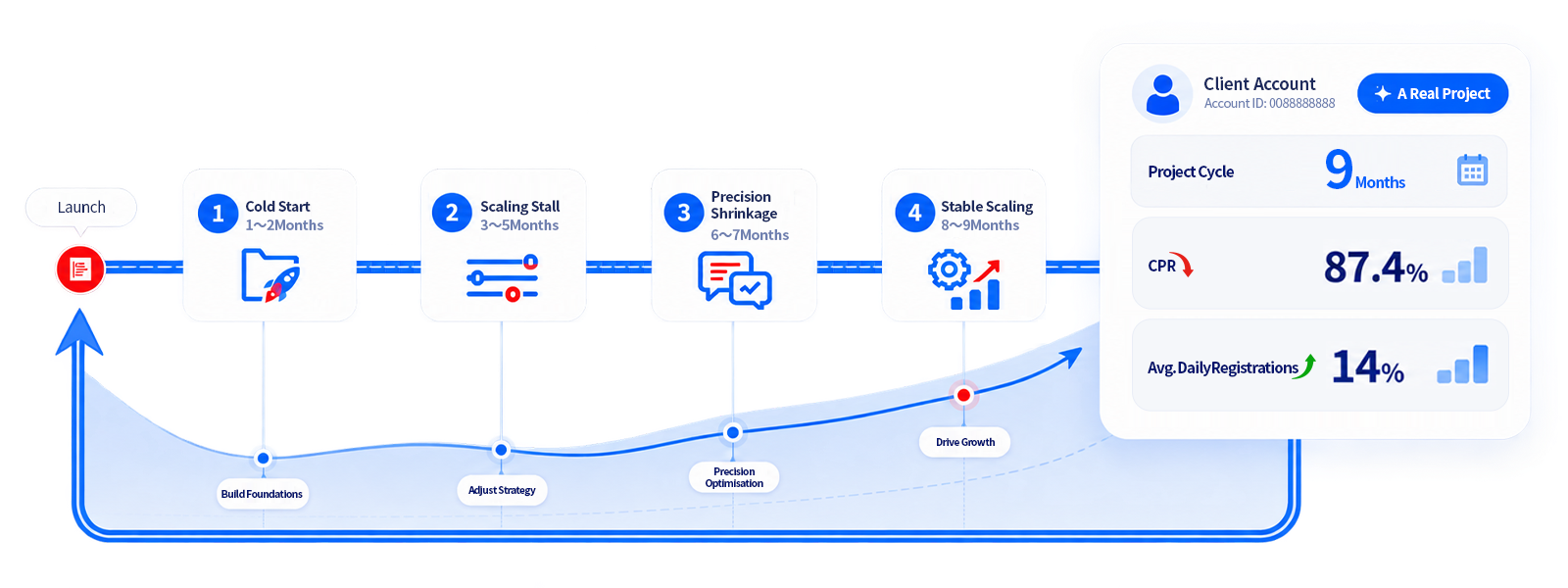
9‑Month Journey, 4 Optimization Phases, 1 Real‑World Account
This complete combat record is backed by nearly $650,000 in ad spend. From cold launch and scaling stagnation to targeted budget optimisation — the cost‑per‑registration dropped by approximately 87.4%, while daily registrations rose by 14%, with zero compromise on client pricing. We will walk through all data details chronologically so every metric is fully traceable.
2,580
Registrations
Average cost‑per‑registration: HK$251
859
Actual Attendees
Attendance Rate: ~33%
79
Closed Deals
Average client value: HK$24,600
87
%
Reduction in cost‑per‑registration
HK$820 → HK$103
What You Will Take Away
3 Actionable Tools You Can Deploy Today
No theoretical knowledge. Every tool is derived from real‑account records and can be directly replicated for your own webinars.
First Tool
A replicable attendance‑rate workflow table
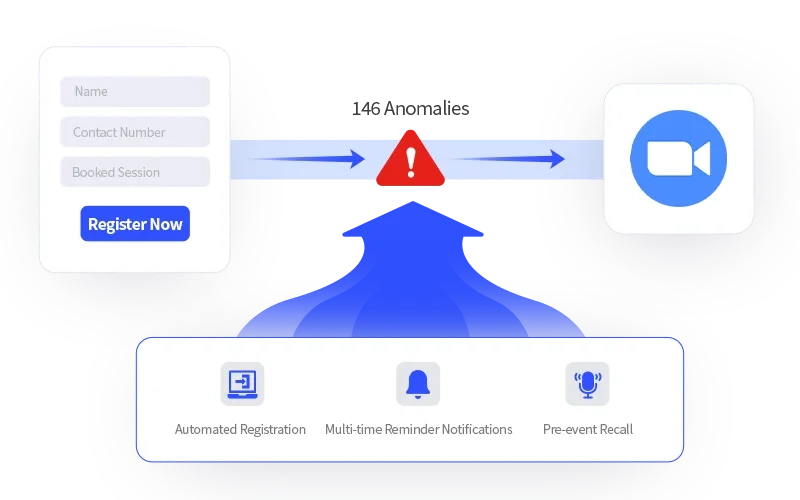
The conversion funnel from form registration to actual attendance is a commonly overlooked blind spot for most businesses. In this case, the workflow that auto‑triggers Zoom registration upon form submission ran 3,246 times, with 146 failures. Without real‑time monitoring, these potential leads would be lost unnoticed.
Automated Registration: Meeting registration is completed instantly once users select a session via the form.
Targeted Reminder Notifications: A full‑set reminder workflow and message templates covering T‑72h to T+2min.
Last‑push Engagement Mechanism: Automated message sent 5 minutes after the webinar starts to re‑engage absentees.
Second Tool
A method to connect ad clicks all the way to closed deals
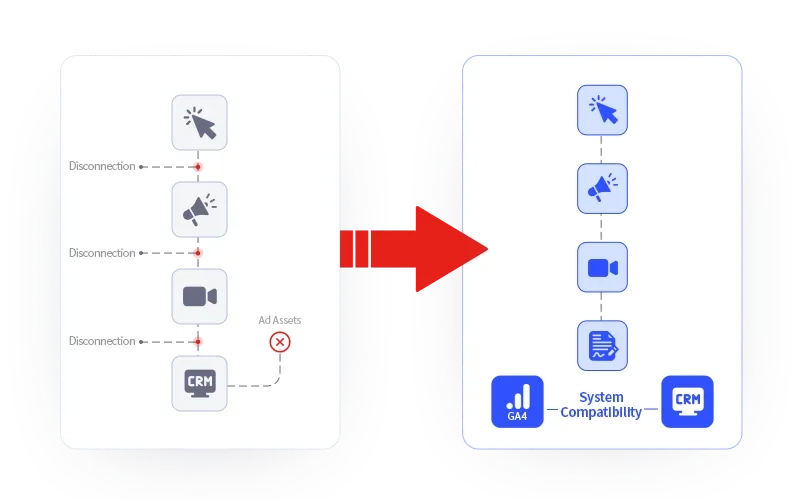
Common broken‑link journey: Ad click → (data break) Landing page → (data break) Zoom → (data break) CRM. After three data disconnections, you can no longer attribute final sales back to your original ad creatives. In this case, a unique click‑ID was used to seamlessly link 16 data sources, 9 destination platforms and 73 forwarding configurations, tracking a total of 170,000 events with an overall data delivery rate of 98.1%.
Accurate Attribution Feedback: Attendance and conversion data are sent back to ad platforms in real‑time, achieving a 99.5% delivery success rate.
Creative‑Level Tracking: Every closed deal can be precisely traced back to the exact ad creative that generated it.
Seamless System Compatibility: Fully compatible with your existing GA4 and CRM. No system replacement or account‑access takeover required.
Third Tool
10 Clear‑cut Advertising Guardrails plus a review mechanism with execution receipts
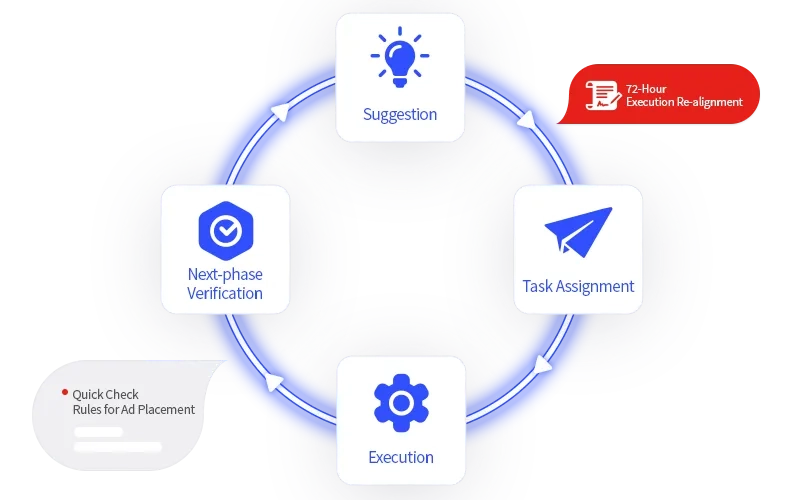
Instantly eliminate zero‑conversion campaigns, pause ads with outlier CPL values, refresh creatives automatically after 45 days of runtime, flag exposure as oversaturated once frequency hits 5+, and more. These 10 actionable rules will be shared live for immediate deployment. We will also demonstrate how to turn marketing reviews into executable action items instead of mere meeting minutes.
Quick‑Reference Rule Sheet: Downloadable cheat‑sheet of 10 threshold rules, accessible via QR‑code during the session
Closed‑Loop Workflow: Establish a full execution cycle: Recommendation → Task Assignment → Implementation → Next‑Cycle Validation
Case data: 153 work orders created, with 72 completed with execution receipts
The funnel to be dissected during the session
From the moment they hit submit, until the algorithm learns to find the next‑similar lead
There are only four intermediate steps in‑between. Any step can break without warning — no error message will pop up, leaving you with blank data. Below are the execution counts, success rates and processing durations recorded from the live‑account case. You can audit your own funnel stage‑by‑stage following these four steps.
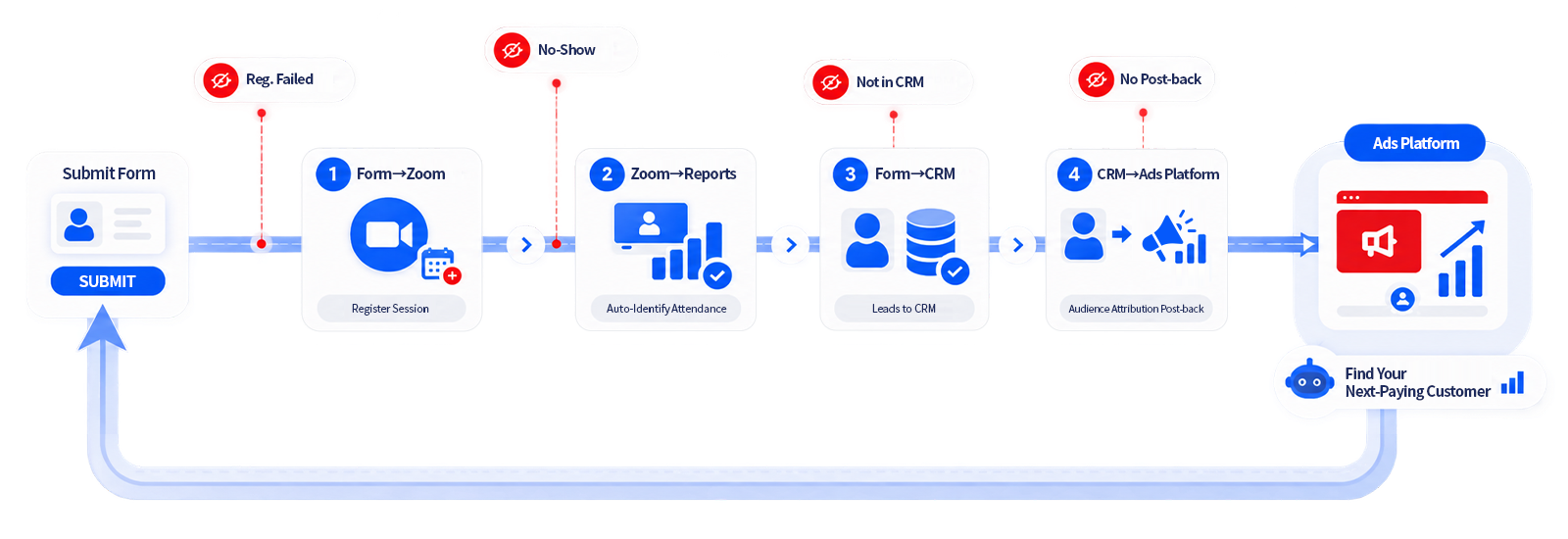
Stage 1 · Form → Zoom
Whichever session the attendee selects is the one they get registered for.
The session dropdown contains the webinar ID. The instant a participant clicks submit, they are added directly to the corresponding Zoom attendee list — no spreadsheet imports, no manual additions, no waiting for operations staff the next working day. The six qualification‑survey responses from the form are also passed into Zoom. Instead of seeing merely a name and phone number, your sales team gets a full‑fledged lead profile in the backend.
Case Test Results: 3,246 automatic registrations, 95.1% success rate. Median time from form submission to appearing on the Zoom attendee list: 6 seconds, with 97 % completed within 10 seconds.
Out of the 146 failed registrations, 53 stemmed simply from missing or incorrect email entries — issues that can be caught right at the form. Validation rules will be shared during the session.
Stage 2 · Zoom → Your Reporting Dashboard
You will know who actually joins within seconds.
As soon as attendees enter the webinar room, their join‑in timestamp and session ID are automatically fed into your report. Attendance rate is no longer a post‑event estimate calculated by manually cross‑referencing exported attendee lists against registration forms. Instead, you get timestamped records that can be filtered by session or by ad creative.
Case Test Results: 859 attendance records, 735 unique attendees across 13 live sessions. Median latency between joining the webinar and data syncing to your database: 5 seconds, with 90 % completed within 10 seconds.
Re‑connections after disconnection (124 occurrences in this case) are not double‑counted, since identification relies on attendee‑ID rather than display name.
Stage 3 · Form → CRM
Leads land in your CRM pre‑populated with 16 data fields.
Beyond name and contact number, records include the selected webinar session, responses to the six qualification questions, plus source details for the ad, creative and audience segment that drove the lead. Tags are assigned automatically based on lead source, and leads are routed straight to the relevant sales team with no manual hand‑off. This enables sales representatives to open conversations with highly relevant context.
Case Test Results: 3,942 leads written to CRM, 100% delivery rate with a median sync time of 4 seconds. An additional 850 entries were sent to WhatsApp CRM with a 96.1% success rate (integration launched May 2026).
84.9% of leads shared the identical 16‑field mapping: 4 identity‑contact fields + 7 qualification‑and‑session fields + 5 ad‑attribution fields.
Stage 4 · CRM → Ad Platform
Train your algorithm on paying customers, not just form‑fillers.
The moment sales marks a deal as closed inside your CRM, the conversion event is sent to your ad backend within seconds. Your ad platform then shifts its seed audience for lookalike targeting from “people who submitted a form” to “attendees who completed the session and spent over $20,000”. This final stage determines who your advertising budget will reach in the month ahead.
Case Test Results: 64 attendance‑data callbacks, 100 % successful; 110 deal‑conversion callbacks with an 86.4 % success rate and a median delivery latency of 3.5 seconds.
We will share the raw‑error logs during the session to explain what caused the 13.6 % failure rate and how you can recover those lost conversions.
Two Critical Hidden Loopholes to Be Exposed Live at the Webinar
Two Real‑World Issues You Cannot Afford to Ignore
We could have chosen not to share this section. Yet as industry peers, we understand that even the most polished solutions encounter challenges during live deployment. For this reason, we are openly disclosing these two practically‑unresolved areas, which will be broken down and fully demonstrated at the webinar.
1
The 859 attendance records returned from Zoom lack key identifiers such as email, phone number and full name. As a result, live‑session attendees cannot be matched against later‑stage converted customers inside your CRM. We will reveal our solution during the webinar: how to write the Click‑ID into a custom field on your Zoom registration form, enabling end‑to‑end data connectivity. Sample text is provided; you may replace it with your own business assets and information.
2
Within this configuration setup, one advertising channel failed across 71 rounds of testing and has still not been deployed for live operation. Every marketing channel discussed at the webinar will be clearly labelled with its real‑world operational status, with no undisclosed setbacks.
Walk through these four stages against your own funnel, which will take roughly 20 minutes. Whichever stage you cannot answer “When was the last verification?” for, is where your ad budget has been leaking all year without showing up on reports.
FAQ Before Registration
Get Clear Before You Decide To Join
This webinar is designed for industry practitioners. We start with five critical questions to frame the discussion.
Who Is This Webinar For?
This session is tailored for businesses that generate leads through Zoom webinars, online events or offline seminars, and whose sales rely heavily on expert‑led demonstrations and trust‑building to close deals. Ideal participants include Marketing Directors, Growth Leads, and Founders overseeing both ad campaigns and sales alignment. Even if you have not yet hosted webinars, the four‑stage baseline framework shared during the session can serve directly as your event‑planning checklist.
Will this solution be overkill for our smaller‑scale business?
Take our case study as an example: only 79 deals were closed within nine months, an average of fewer than nine sales each month. The priority is not the volume of your data, but the ability to trace every single order back to its exact ad creative and Click‑ID. This supplies your ad platform with high‑quality seed audiences, instead of low‑value leads who merely fill‑out forms with no intention to purchase.
Why do we need this system if we already use GA4 and a CRM?
GA4 tracking stops the moment users leave your website, while your CRM only begins recording data once sales representatives manually enter records. There exists a critical data gap covering the journey from landing‑page registration to webinar attendance, and then to the first sales follow‑up, which neither tool can fully capture. Our solution fills this exact gap, working alongside your existing stack — no replacement required.
Will this be a sales‑heavy presentation?
We will share actionable, hands‑on strategies. Two practical resources will be provided live‑the “10 Validation Threshold Rules” and the Attendance‑Rate Improvement Mechanism Checklist, which you can take away with no purchase required. A free diagnostic consultation will be offered at the end for those looking to optimise further, and participation is entirely optional.
What if I cannot attend the live session?
Simply reply “Reschedule” after registration, and we will reserve your spot for the next webinar at no extra cost. All registered participants will also gain access to the full‑length recording and transcript once the event concludes.
Register Now
Secure your spot
The form takes approximately 60 seconds to complete. The final two questions will shape the focus of our session — we will adjust the agenda live based on participants’ real‑world needs.
You will receive the Zoom link and one‑click calendar invitation right after submission.
The complimentary Webinar‑Marketing Account‑Health Checklist will be shared with you before the session.
Full‑length recording and transcript will be available afterwards; rescheduling is possible if you cannot attend live.
This webinar only analyses complete data from real‑world accounts, with no hard‑sell product demonstrations.
Quick‑Reference Checklist: 10 Advertising Guardrails — Sent immediately upon registration, whether or not you attend the live session.

Topkee — Marketing Connected to Revenue
Services
Products
© 2011–2026 Topkee Media. All rights reserved. | Topkee Pte. Ltd. (UEN 202441113M)